
A full SaaS website for an AI automation platform - built to turn curious visitors into paying customers in just 1 week.
A 19-page SaaS site built in 1 week - and a 62% lift in signups
NexusAI's existing site was a generic WordPress template - slow, unbranded, and failing to convert the traffic their ads were already generating. We built a full 19-page SaaS site from scratch: a dark, purple-accented design system, a hero built for immediate credibility, and every page answering the next logical question a visitor might have before leaving. Within a month of launch, free trial signups rose 62%, bounce rate dropped from 74% to 41%, and the site scored 98 on mobile PageSpeed.
The Highlights
We're not walking you through every page - that's not very interesting. Here are seven specific blocks pulled straight from the live build that we'd point to as proof of the work.
Interactive Hero Robot
Home Page - HeroWhat it does
A real-time 3D robot rendered next to the hero headline that tracks the visitor's cursor - its head and torso turn to follow the mouse wherever it moves on screen, alongside a typewriter effect cycling through the headline copy.
Key decisions
- A live 3D model instead of a looping animation, so the motion is genuinely responsive rather than pre-baked - it reacts to wherever the cursor actually is, not a scripted path
- Dark, reflective materials keep the robot consistent with the purple-accented dark design system rather than reading as a bright, cartoonish mascot
- Positioned opposite the headline so the eye lands on the copy first, then the motion pulls attention across toward the CTA
Built Different
Home Page - Feature GridWhat it does
A bento-style block partway down the home page that turns "we do automation" into something you can watch working: an Input → NexusAI → Output flow, a 48-hour setup promise, and three supporting cards for monitoring, compliance and API access.
Key decisions
- The flow diagram makes an abstract product concrete in three icons - no explanation needed
- "Live in 48 hours" sits inside the grid itself, not buried in body copy, so speed reads as a feature
- Four supporting cards let both technical and non-technical buyers each find their own reason to trust the platform in one scan
Testimonial Wall
Home Page - Social ProofWhat it does
A two-row marquee of five-star reviews directly under "Don't take our word for it" - real names, roles and results scrolling continuously so eight-plus quotes fit in the space one carousel slide would take.
Key decisions
- Continuous horizontal scroll, not a click-through carousel, means every visitor sees multiple proof points passively
- Two rows moving independently keep the block feeling alive rather than static
- Every quote pairs a concrete result (40 hours saved, 34% revenue lift) with a name and title - specificity over generic praise
Template Gallery
Templates Page - Self-ServeWhat it does
The Ready-to-Use Automation Templates page: a filterable gallery by team (Sales, Marketing, Operations, Support, Finance), and a template detail view with a numbered "How It Works" walkthrough and a sticky "Use This Template" panel.
Key decisions
- Category filters let a visitor jump straight to their function instead of scanning the whole library
- Setup time ("5 min setup") shown on every card up front removes the fear that this is a dev project
- The detail page's step-by-step breakdown does the selling before the CTA is even in view
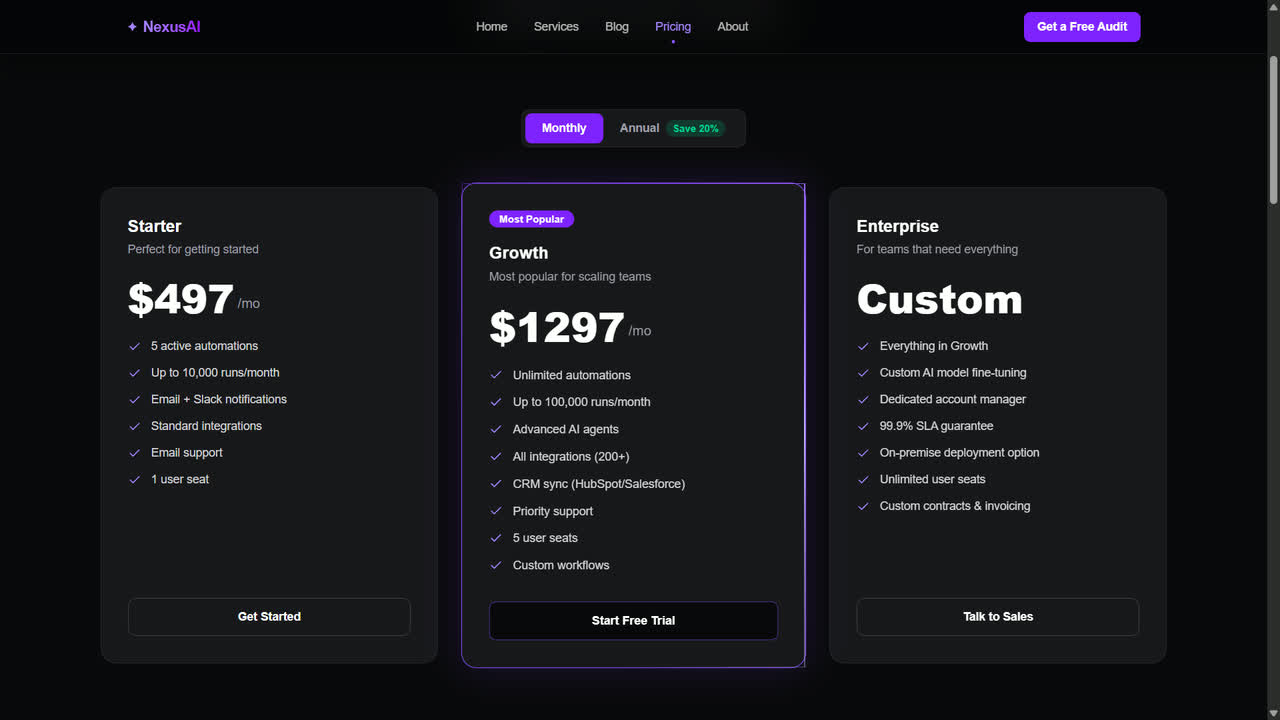
Pricing Tiers
Pricing Page - DecisionWhat it does
The core of the pricing page: three plans (Starter, Growth, Enterprise) with a Monthly/Annual toggle and the Growth plan visually elevated as "Most Popular" to anchor the decision.
Key decisions
- Growth plan is raised and outlined in accent purple - most buyers pick the recommended middle option, not the cheapest
- Feature lists grow down each tier so upgrading visibly means "more," not just "more expensive"
- The annual toggle shows "Save 20%" as a pill, not a footnote, to nudge upfront commitment
ROI Calculator
Pricing Page - ProofWhat it does
An interactive block beneath the pricing tiers: drag "hours wasted per week," enter your team's hourly cost, and monthly savings, annual savings and payback time update live - no submit button.
Key decisions
- Real-time updates, not a "Calculate" button, make the tool feel like a live financial model, not a lead-gen gimmick
- Payback expressed in months ("pays for itself in 1 month") is more visceral than a percentage or dollar figure alone
- Sliders pre-filled with realistic defaults so the tool proves value before a visitor touches anything
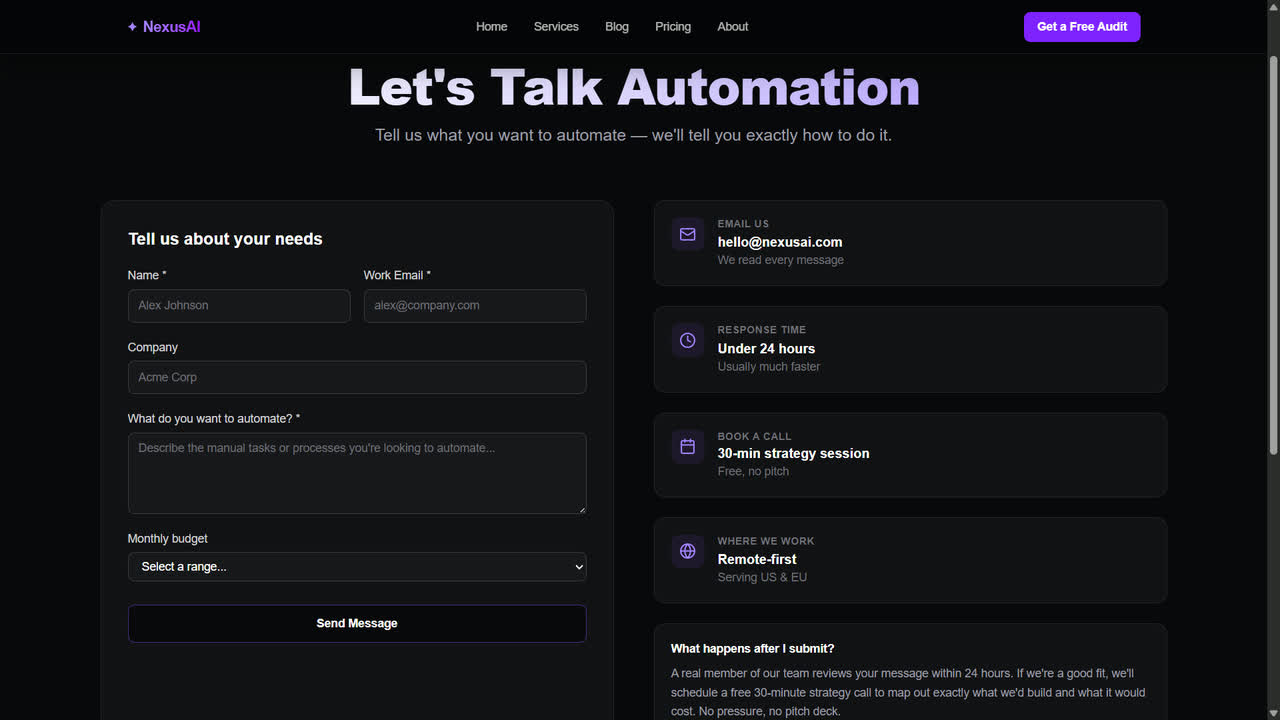
Contact Form
Contact Page - Final StepWhat it does
The "Let's Talk Automation" block: a right-sized form (name, work email, company, what to automate, budget) next to a response-time promise, a book-a-call option, and a short FAQ on what happens after you submit.
Key decisions
- Budget uses a dropdown range instead of an open text box - lowers the friction of a number visitors are often unsure about
- "Under 24 hours" response time sits in its own card next to the form, not in fine print underneath it
- The "What happens after I submit?" block pre-answers the anxiety that stops people from filling out contact forms at all
Want a site like this?
We're taking on new projects now. No obligation.